ArrayList底层解析
ArrayList 底层解析
Collection类关系图
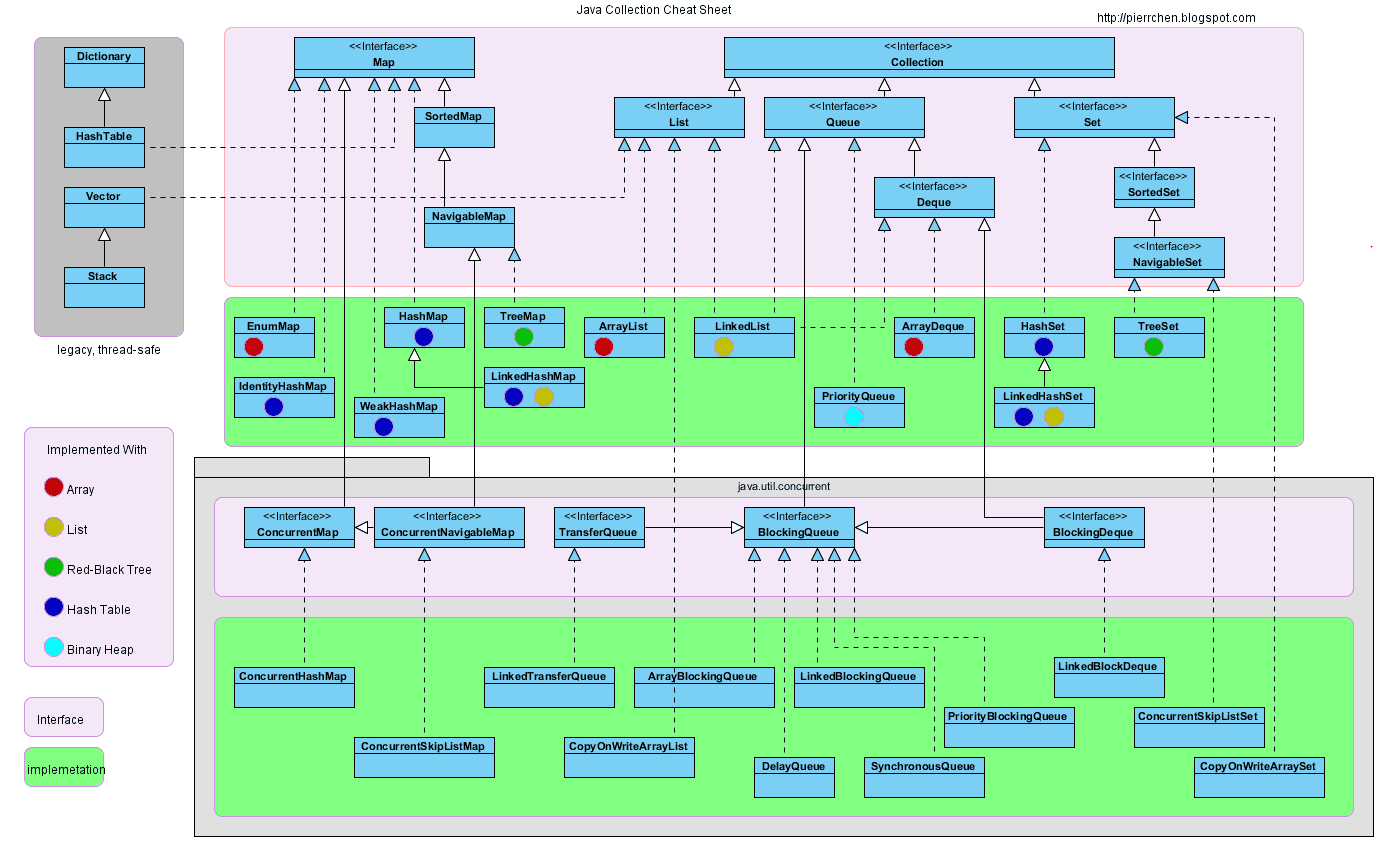
介绍
容器,就是可以容纳其他Java对象的对象。优点如下:
- 降低编程难度
- 提高程序性能
- 提高API间的互操作性
- 降低学习难度
- 降低设计和实现相关API的难度
- 增加程序的重用性
Java容器里只能放对象,对于基本类型(int, long, float, double等),需要将其包装成对象类型后(Integer, Long, Float, Double等)才能放到容器里。很多时候拆包装和解包装能够自动完成。这虽然会导致额外的性能和空间开销,但简化了设计和编程。
容器主要包括 Collection 和 Map 两种,Collection 存储着对象的集合,而 Map 存储着键值对(两个对象)的映射表。
概述
ArrayList实现了List接口,是顺序容器,允许存放null元素,底层通过数组实现。除该类未实现同步外,其余跟Vector大致相同。每个ArrayList都有一个容量(capacity),表示底层数组的实际大小,容器内存储元素的个数不能多余当前容量。当向容器中添加元素时,如果容量不足,容器会自动增大底层数组的大小。这里的数组是一个Object数组。
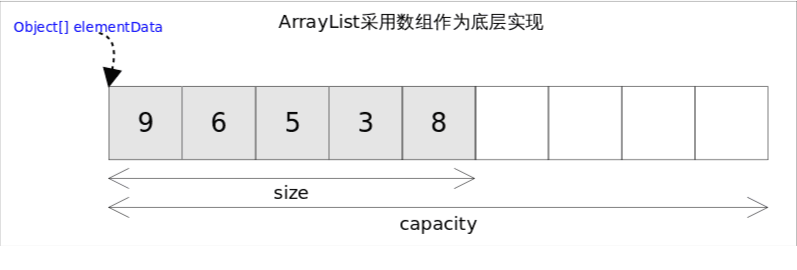
size(), isEmpty(), get(), set()方法均能在常数时间内完成,add()方法的时间开销跟插入位置有关,addAll()方法的时间开销跟添加元素的个数成正比。其余方法大都是线性时间。为追求效率,ArrayList没有实现同步(synchronized)
ArrayList的实现
底层数据结构
1
2
3
4
5
6
7
8
9
10
11
12
13
14
15
16
17
18
19
20
21
	private static final int DEFAULT_CAPACITY = 10;

    /**
    * Shared empty array instance used for default sized empty instances. We distinguish this from EMPTY_ELEMENTDATA to know how much to inflate when first element is added
    **/
	private static final Object[] DEFAULTCAPACITY_EMPTY_ELEMENTDATA = {};

	/**
     * The array buffer into which the elements of the ArrayList are stored.
     * The capacity of the ArrayList is the length of this array buffer. Any
     * empty ArrayList with elementData == DEFAULTCAPACITY_EMPTY_ELEMENTDATA
     * will be expanded to DEFAULT_CAPACITY when the first element is added.
     */
    transient Object[] elementData; // non-private to simplify nested class access

    /**
     * The size of the ArrayList (the number of elements it contains).
     *
     * @serial
     */
	private int size;
elementData被称为数组缓冲区,ArrayList的容量是此数组缓冲区的长度。(非私有,以简化嵌套类访问)其最开始等于DEFAULTCAPACITY_EMPTY_ELEMENTDATA的空数组,在添加第一个元素时将扩展为
DEFAULT_CAPACITY构造函数
1
2
3
4
5
6
7
8
9
10
11
12
13
14
15
16
17
18
19
20
21
22
23
24
25
26
27
28
29
30
31
32
33
34
35
36
37
38
39
40
41
42
43
44
45
46
47
48
49
50
51
52
53
54
    /**
    * Shared empty array instance used for empty instances.
    **/
	private static final Object[] EMPTY_ELEMENTDATA = {};

    /**
    * Shared empty array instance used for default sized empty instances. We distinguish this from EMPTY_ELEMENTDATA to know how much to inflate when first element is added
    **/
	private static final Object[] DEFAULTCAPACITY_EMPTY_ELEMENTDATA = {};

	/**
     * Constructs an empty list with the specified initial capacity.
     *
     * @param  initialCapacity  the initial capacity of the list
     * @throws IllegalArgumentException if the specified initial capacity
     *         is negative
     */
    public ArrayList(int initialCapacity) {
        if (initialCapacity > 0) {
            this.elementData = new Object[initialCapacity];
        } else if (initialCapacity == 0) {
            this.elementData = EMPTY_ELEMENTDATA;
        } else {
            throw new IllegalArgumentException("Illegal Capacity: "+
                                               initialCapacity);
        }
    }

    /**
     * Constructs an empty list with an initial capacity of ten.
     */
    public ArrayList() {
        this.elementData = DEFAULTCAPACITY_EMPTY_ELEMENTDATA;
    }

    /**
     * Constructs a list containing the elements of the specified
     * collection, in the order they are returned by the collection's
     * iterator.
     *
     * @param c the collection whose elements are to be placed into this list
     * @throws NullPointerException if the specified collection is null
     */
    public ArrayList(Collection<? extends E> c) {
        elementData = c.toArray();
        if ((size = elementData.length) != 0) {
            // c.toArray might (incorrectly) not return Object[] (see 6260652)
            if (elementData.getClass() != Object[].class)
                elementData = Arrays.copyOf(elementData, size, Object[].class);
        } else {
            // replace with empty array.
            this.elementData = EMPTY_ELEMENTDATA;
        }
    }
由以上构造函数可知:
- List arrayList = new ArrayList():初始数组为DEFAULTCAPACITY_EMPTY_ELEMENTDATA,初始容量为10
- List arrayList = new ArrayList(4):默认容量为4
自动扩容
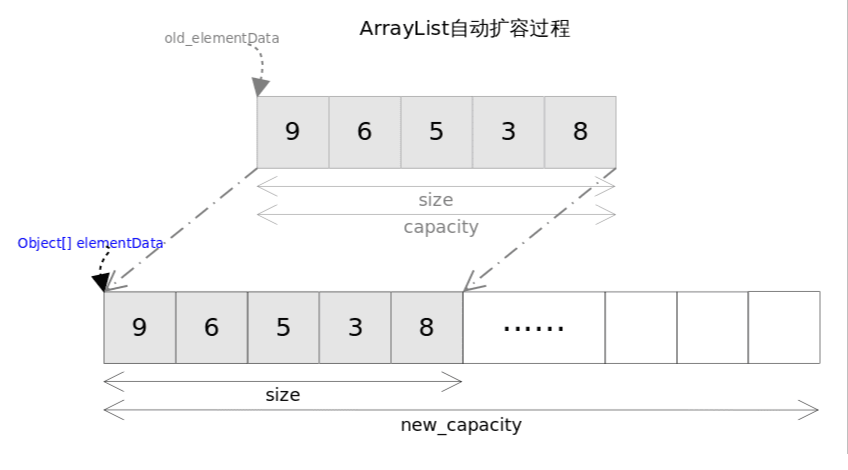
每当向数组中添加元素时,都要去检查添加后元素的个数是否会超出当前数
组的长度,如果超出,数组将会进行扩容,以满足添加数据的需求。数组扩
容通过一个公开的方法ensureCapacity(int minCapacity)来实现。在实际添
加大量元素前,我也可以使用ensureCapacity来手动增加ArrayList实例的容
量,以减少递增式再分配的数量。
数组进行扩容时,会将老数组中的元素重新拷贝一份到新的数组中,每次数
组容量的增长大约是其原容量的1.5倍。这种操作的代价是很高的。
1
2
3
4
5
6
7
8
9
10
11
12
13
14
15
16
17
18
19
20
21
22
23
24
25
26
27
28
29
30
31
32
33
34
35
36
37
38
39
40
41
42
43
44
45
46
47
48
49
50
51
52
53
54
55
56
57
58
59
60
61
62
    public void ensureCapacity(int minCapacity) {
        int minExpand = (elementData != DEFAULTCAPACITY_EMPTY_ELEMENTDATA)
            // any size if not default element table
            ? 0
            // larger than default for default empty table. It's already
            // supposed to be at default size.
            : DEFAULT_CAPACITY;

        if (minCapacity > minExpand) {
            ensureExplicitCapacity(minCapacity);
        }
    }

    private static int calculateCapacity(Object[] elementData, int minCapacity) {
        if (elementData == DEFAULTCAPACITY_EMPTY_ELEMENTDATA) {
            return Math.max(DEFAULT_CAPACITY, minCapacity);
        }
        return minCapacity;
    }

    private void ensureCapacityInternal(int minCapacity) {
        ensureExplicitCapacity(calculateCapacity(elementData, minCapacity));
    }

    private void ensureExplicitCapacity(int minCapacity) {
        modCount++;

        // overflow-conscious code
        if (minCapacity - elementData.length > 0)
            grow(minCapacity);
    }

    /**
    * The maximum size of array to allocate. Some VMs reserve some header words in an array. Attempts to allocate larger arrays may result in OutOfMemoryError: Requested array size exceeds VM limit
    **/
	private static final int MAX_ARRAY_SIZE = Integer.MAX_VALUE - 8;

    /**
    * Increases the capacity to ensure that it can hold at least the number of elements specified by the minimum capacity argument.
    Params:
    minCapacity – the desired minimum capacity
    **/

    private void grow(int minCapacity) {
        // overflow-conscious code
        int oldCapacity = elementData.length;
        int newCapacity = oldCapacity + (oldCapacity >> 1);
        if (newCapacity - minCapacity < 0)
            newCapacity = minCapacity;
        if (newCapacity - MAX_ARRAY_SIZE > 0)
            newCapacity = hugeCapacity(minCapacity);
        // minCapacity is usually close to size, so this is a win:
        elementData = Arrays.copyOf(elementData, newCapacity);
    }

    private static int hugeCapacity(int minCapacity) {
        if (minCapacity < 0) // overflow
            throw new OutOfMemoryError();
        return (minCapacity > MAX_ARRAY_SIZE) ?
            Integer.MAX_VALUE :
            MAX_ARRAY_SIZE;
    }
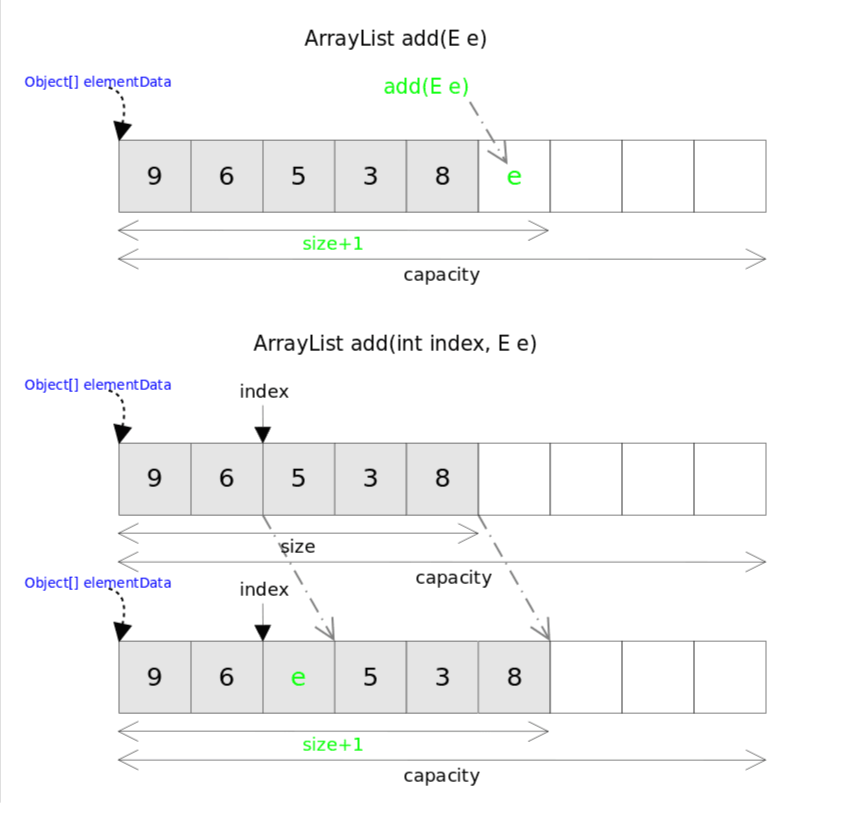
add(), addAll()
跟c++的vector不同,ArrayList对标于
push_back()的方法是add(E e),ArrayList也没有insert()方法,对应的方法是add(int index, E e)。这两个方法都是向容器中添加新元素,这可能会导致capacity不足,因此在添加元素之前,都需要进行剩余空间检查,如果需要则自动扩容。扩容操作最终是
通过
grow()方法完成的。1 2 3 4 5 6 7 8 9 10 11 12 13 14 15 16 17 18 19 20 21 22 23 24 25 26 27 28 29 30
/** * Appends the specified element to the end of this list. * * @param e element to be appended to this list * @return <tt>true</tt> (as specified by {@link Collection#add}) */ public boolean add(E e) { ensureCapacityInternal(size + 1); // Increments modCount!! elementData[size++] = e; return true; } /** * Inserts the specified element at the specified position in this * list. Shifts the element currently at that position (if any) and * any subsequent elements to the right (adds one to their indices). * * @param index index at which the specified element is to be inserted * @param element element to be inserted * @throws IndexOutOfBoundsException {@inheritDoc} */ public void add(int index, E element) { rangeCheckForAdd(index); ensureCapacityInternal(size + 1); // Increments modCount!! System.arraycopy(elementData, index, elementData, index + 1, size - index); elementData[index] = element; size++; }
这里可以看出,使用默认构造方法会创建一个空的对象数组,此时
size=0,在添加第一个元素的时候,调用ensureCapacityInternal(1)来确定内部容量,然后通过calculateCapacity()来计算容量,如果如果数组为空,则返回Math.max(DEFAULT_CAPACITY, minCapacity),所以当第一次添加元素时,数组长度扩容为10。